
A job is an image and a command, and every job has a cap, a log, and a bill.
Hand Kiln a profile, a command, and inputs. It checks the request, holds it against a budget, queues it in order, and keeps the job's record: states, outputs, log, and cost.
Internal to Renkara. Kiln is a tool Renkara Media Group builds and runs for itself. It is not for sale, and there is nothing to buy or join.
Render work, with the books kept.
Kiln is a web app, an API, and a ledger. Kiln is internal to Renkara and is not offered for sale; this site shows what it does and how it is built. The company and the render work on these pages are fictional, and every screen is a capture of the running app. These are the things it does.
A job is an image and a command
A profile, a command, a size
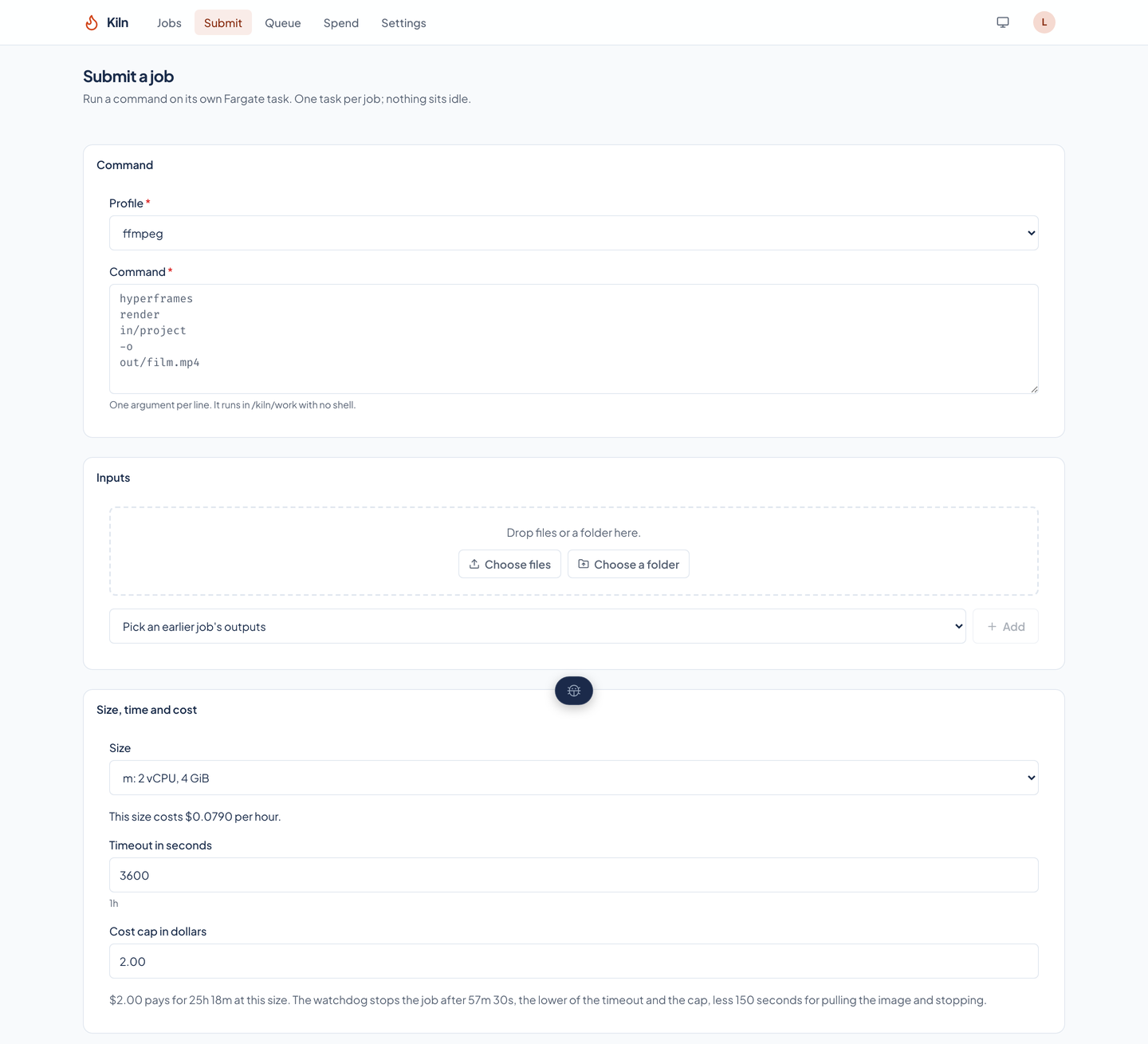
A job names a profile, a command as a list of arguments (1 to 64, each up to 4,096 characters, run with no shell unless the command names one), and a size. A profile is a pinned tool image: FFmpeg, HyperFrames, or a fleet tool's own.
Sizes in Fargate’s own combinations
Six size classes run from half a vCPU and 1 GiB (xs) to 16 vCPU and 32 GiB (xxl). An explicit size must be a combination Fargate accepts, and storage above Fargate's default 20 GiB can be asked for from 21 to 200 GiB.
The cost is on the form
Beside the size, the form shows what it costs per hour. Under the cap it shows how long the cap pays for, and how long the watchdog lets the job run: the lower of the timeout and the cap, less 150 seconds for pulling the image and stopping.
- Inputs from three places
- A job reads files an earlier upload made, the outputs of an earlier job of the same client, or files in the client's own store, each with the SHA-256 it must match. A job takes up to 64 input sources, and two inputs may not land at the same path.
- Secrets are refused
- A job's environment holds at most 32 variables, 32 KB in all, and a name that looks like a secret (TOKEN, SECRET, PASSWORD, CREDENTIAL, a name ending in KEY, or one starting AWS_) is refused when the job is submitted.
- Sending a job twice is safe
- A submission can carry an idempotency key. The same key with the same request returns the existing job, and the same key with a different request is refused as a conflict.
Nothing starts that would overspend
A queue that says why
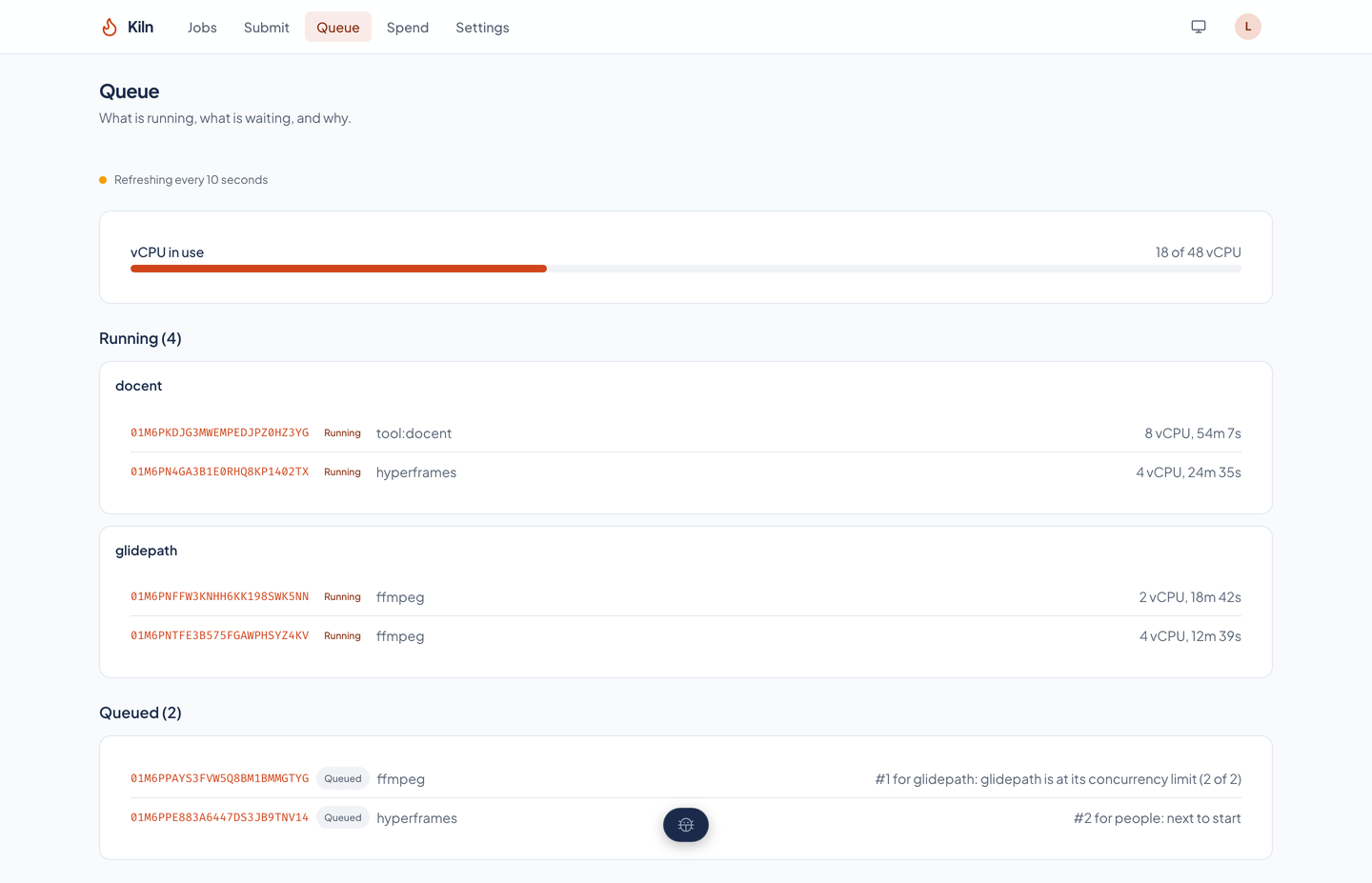
A job waits when its client is over its monthly budget or at its concurrency limit, or when the fleet's 48 vCPU of running jobs are in use. Within a client the order is first in, first out, and across clients it takes turns. The queue page states each waiting job's place and reason, using the same function admission uses.
A monthly budget for every client
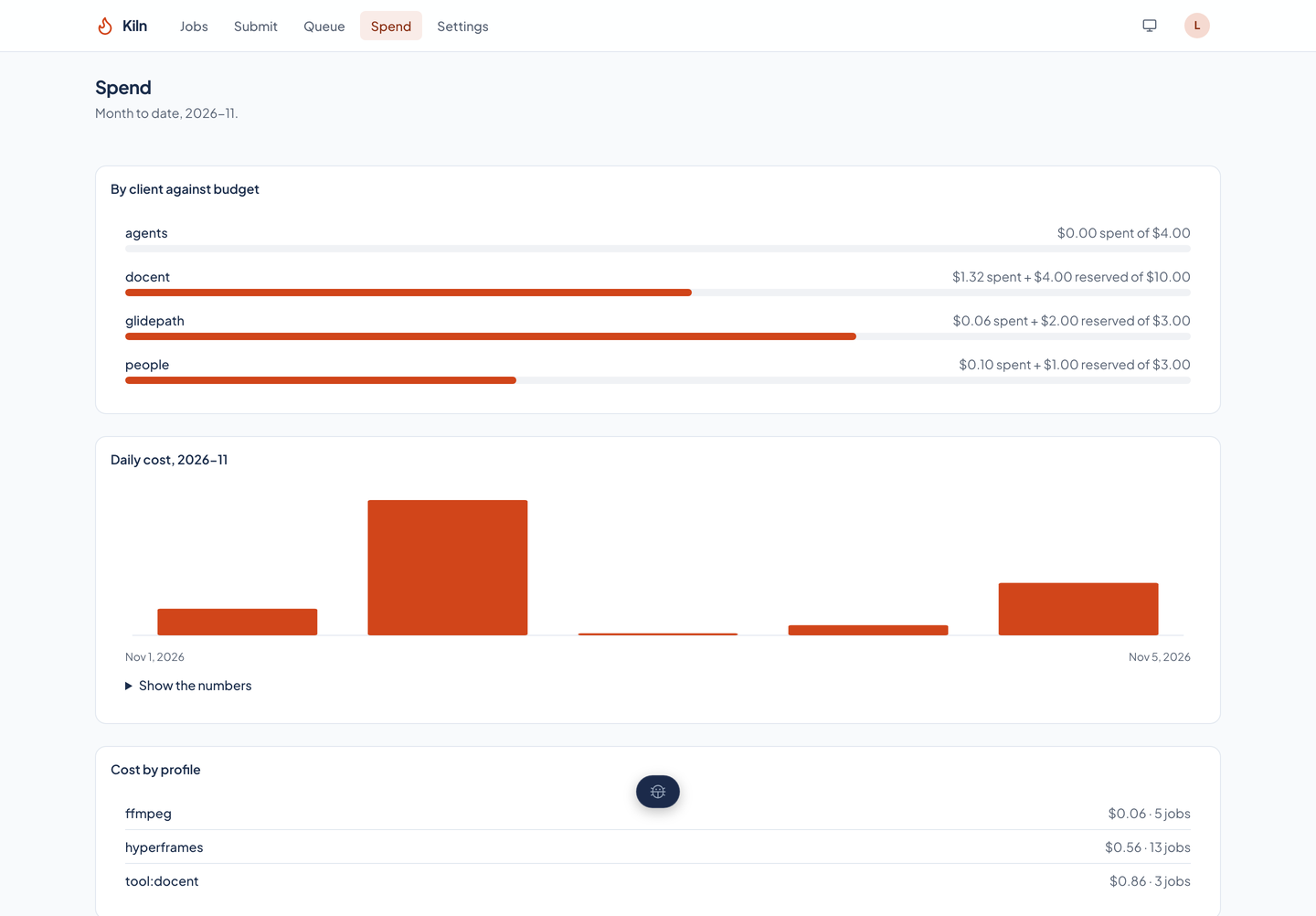
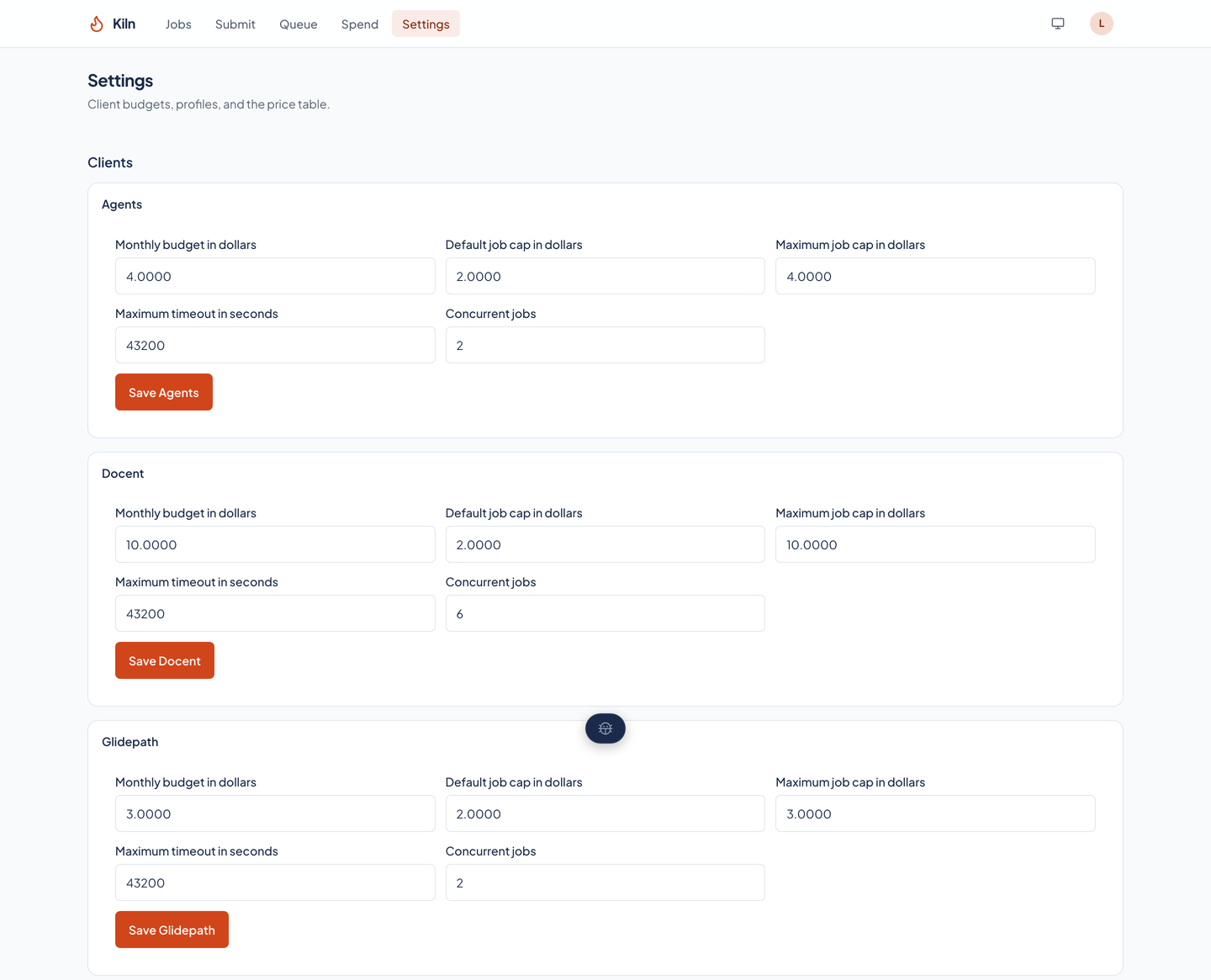
Each client has a monthly budget. A submission is refused before anything runs if its cap, added to what the month's finished jobs cost and the caps of jobs still queued or running, would pass the budget.
A cap and a timeout on every job
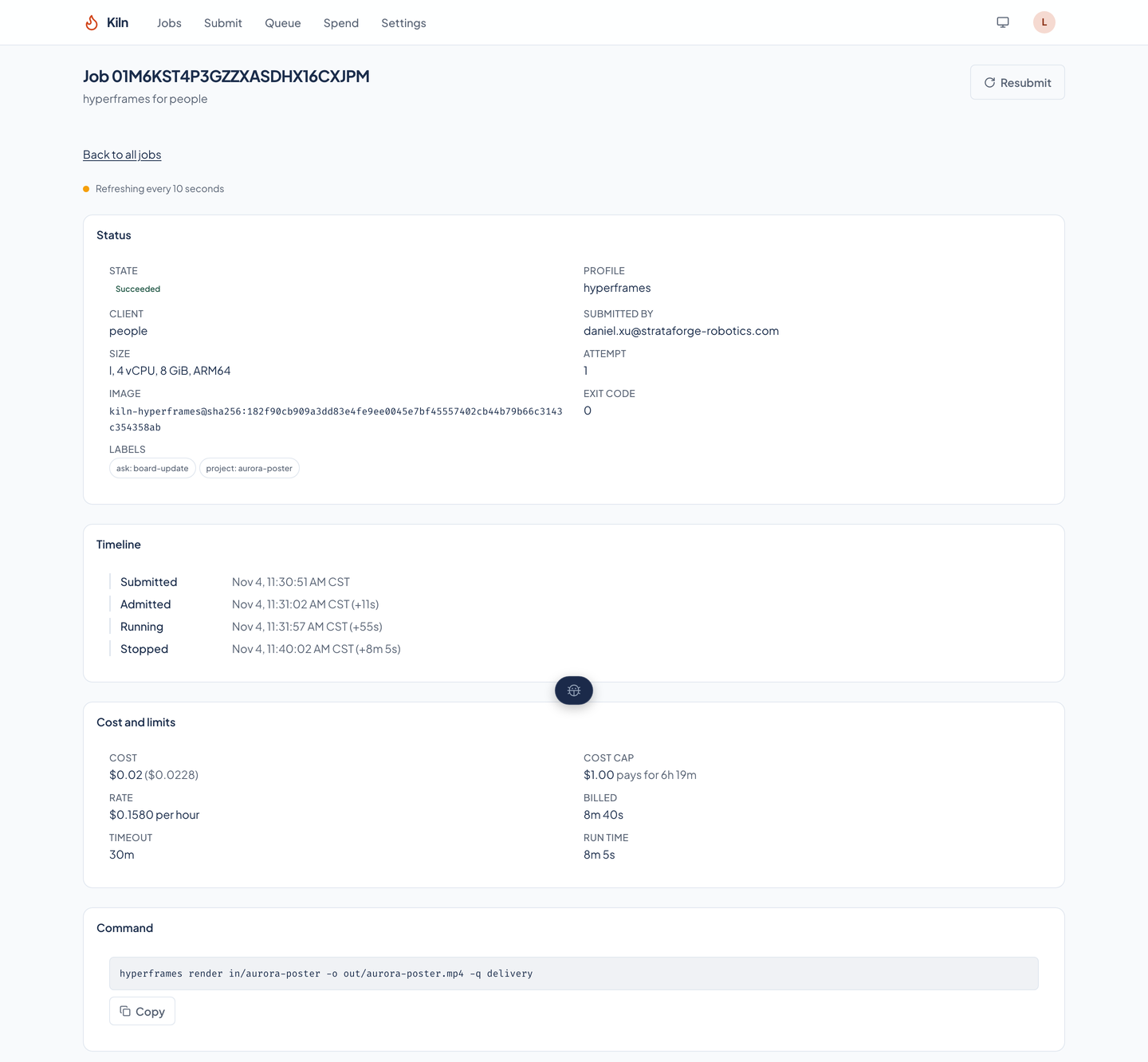
Every job has a cost cap (the client's default if none is given, never above the client's maximum) and a timeout from 60 seconds up to what the profile and client allow. The job's record keeps both, and the watchdog time they work out to.
Everything a job did, kept
One page per job
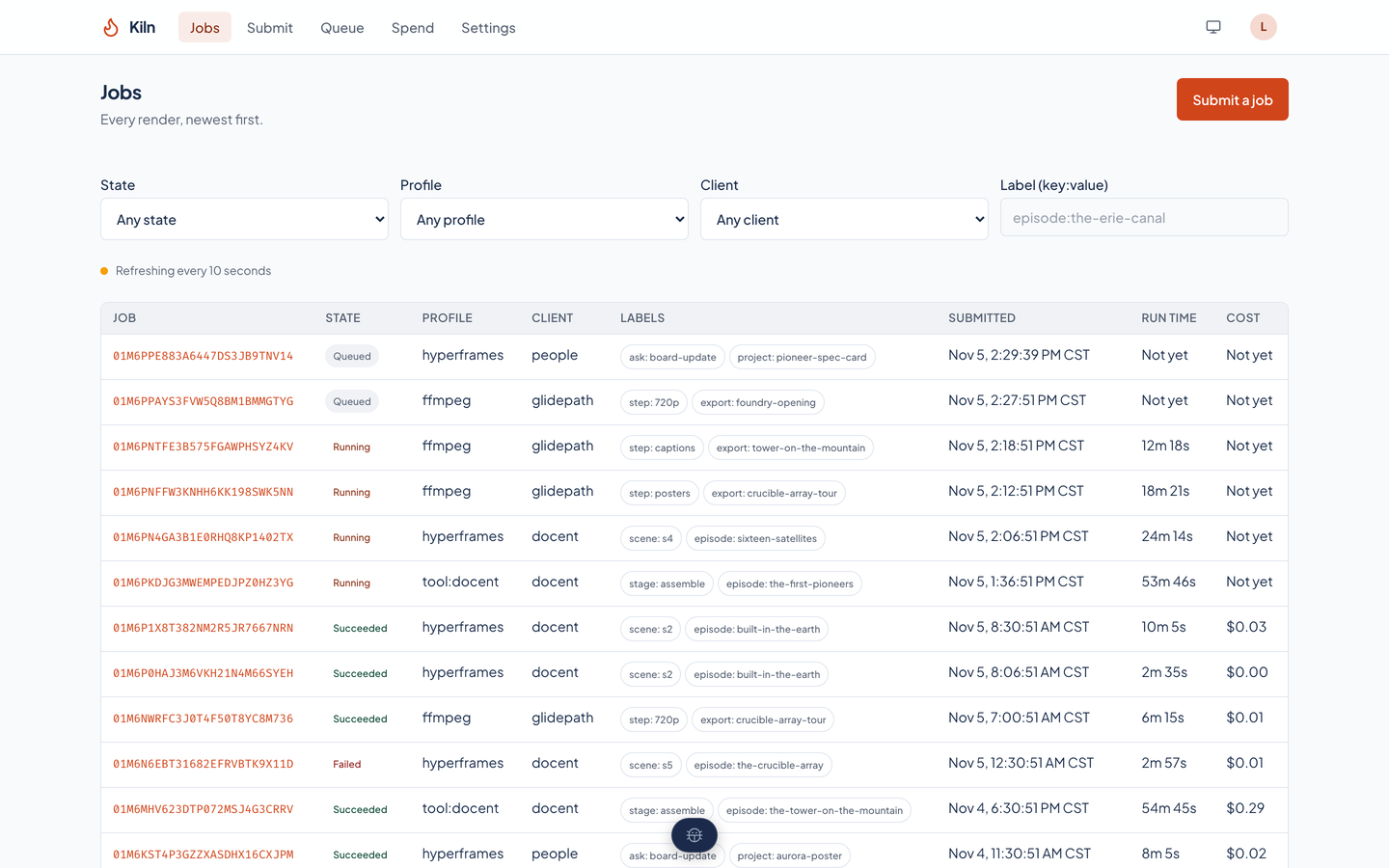
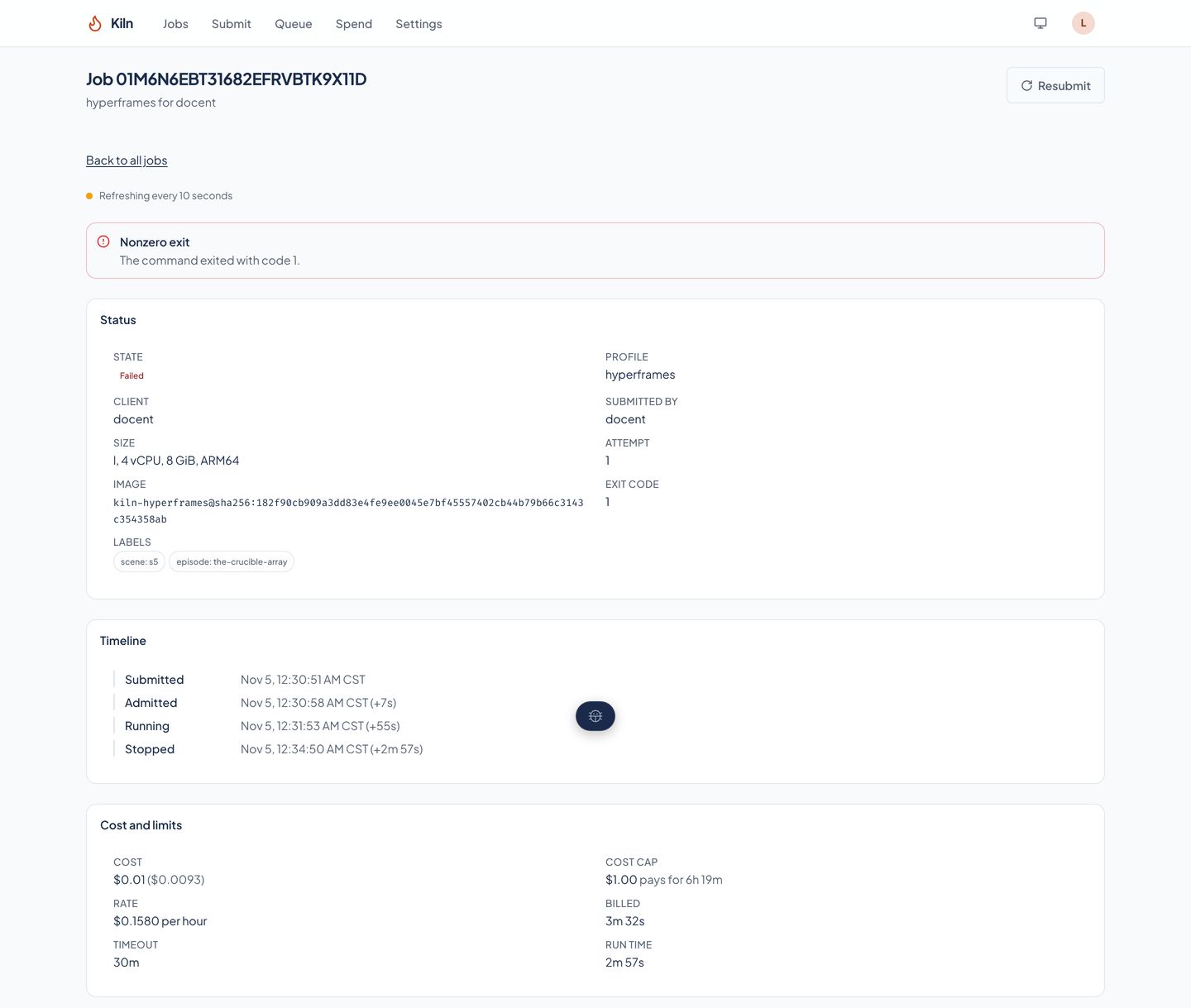
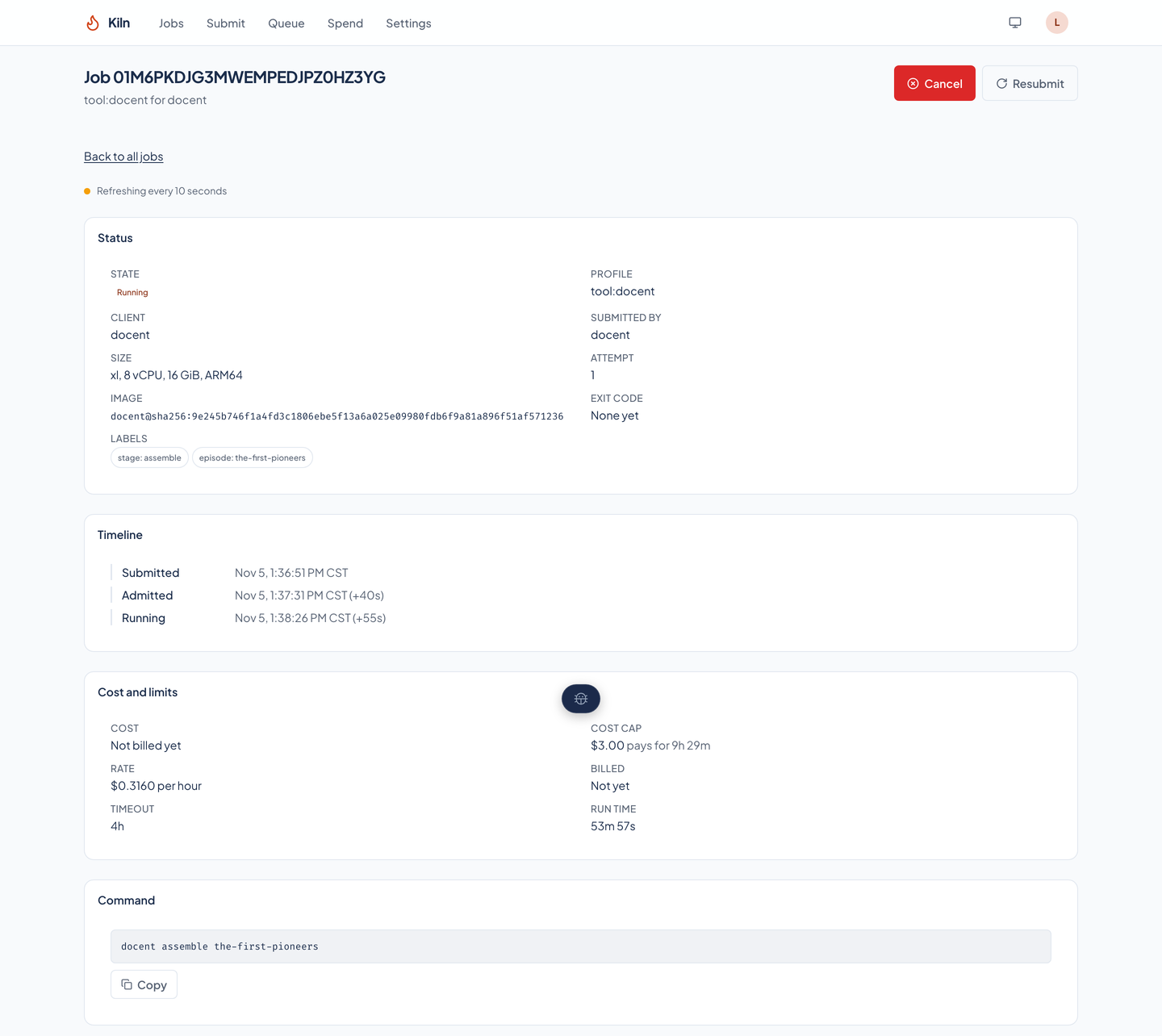
A job's page shows its state, client, profile, who submitted it, size, attempt, image digest, exit code, and labels, then a timeline, its cost and limits, the command, the inputs, the outputs, the log, and the history of state changes.
Outputs with checksums and previews
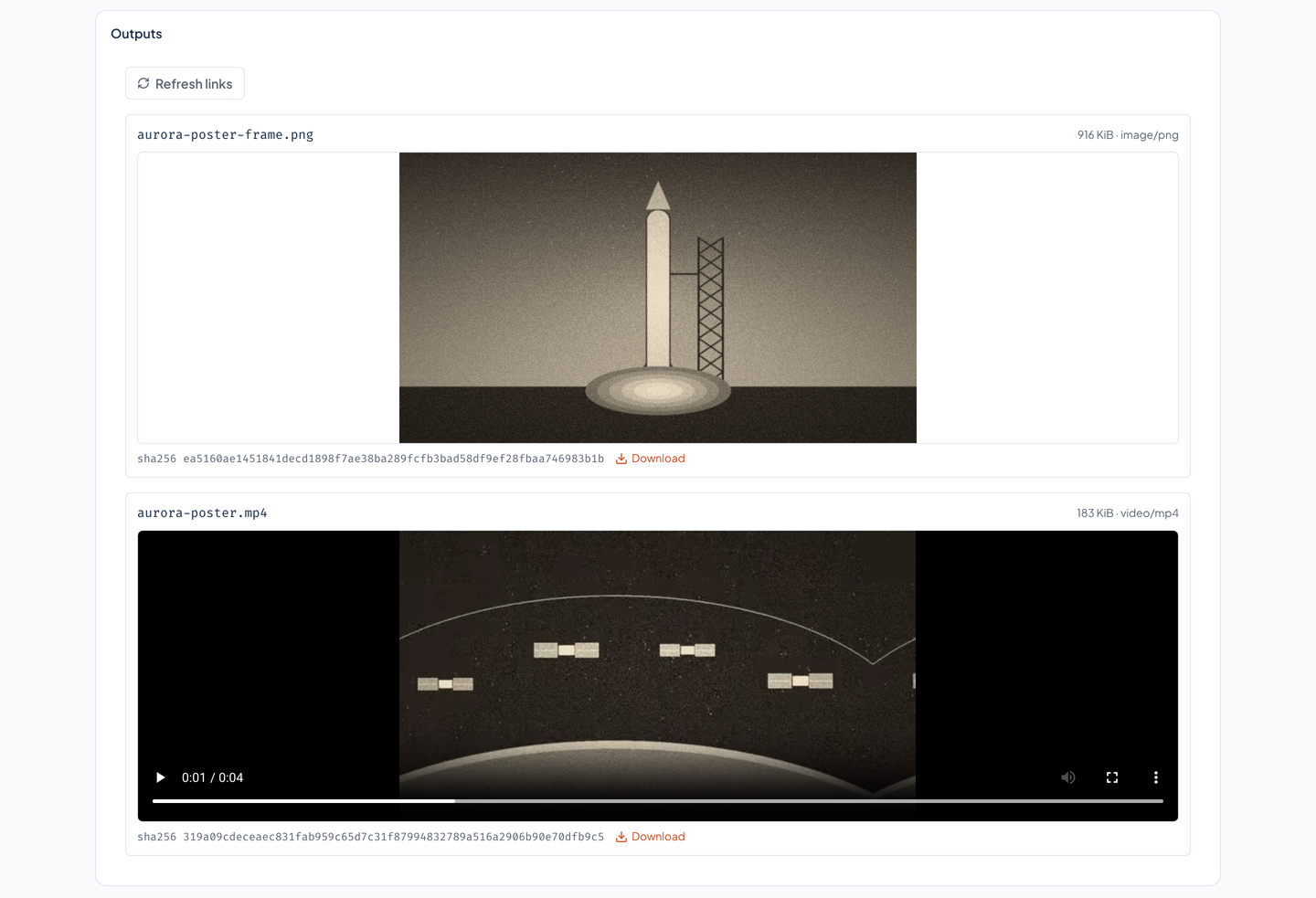
Each output is listed with its size, type, and SHA-256, with a link to download it, and a picture, a film, or a sound plays in the page from a short-lived link.
Logs that follow, then stay
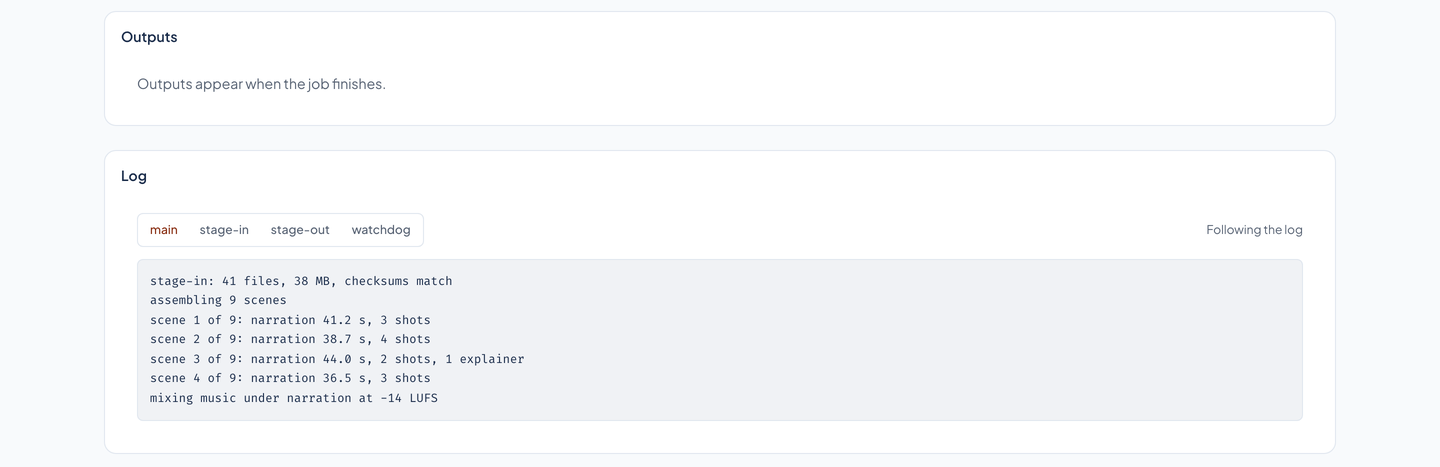
The page follows the log of a job that is running, and reads a finished job's log back from the record. It keeps a tab for each of the four logs a job can have: main, stage-in, stage-out, and watchdog.
Failures that say why
A failed job's record carries a class (it could not start, its inputs or outputs failed, its command exited non-zero, it was lost, or Kiln itself erred) and a reason in words. A job stopped for its timeout or its cap says so, and a canceled one says who canceled it.
- Live without reloading
- The jobs list and the queue update as jobs change, through a stream of server-sent events, and fall back to checking every 10 seconds.
Priced the way Fargate bills
Per second, with a minute minimum
Kiln's cost function takes a job's billed seconds (never fewer than 60, from the start of the image pull to the stop), divides by 3,600, and multiplies by the hourly cost of its size and storage. The job page shows the cost, the rate, and the billed seconds beside the run time.
A dated price table
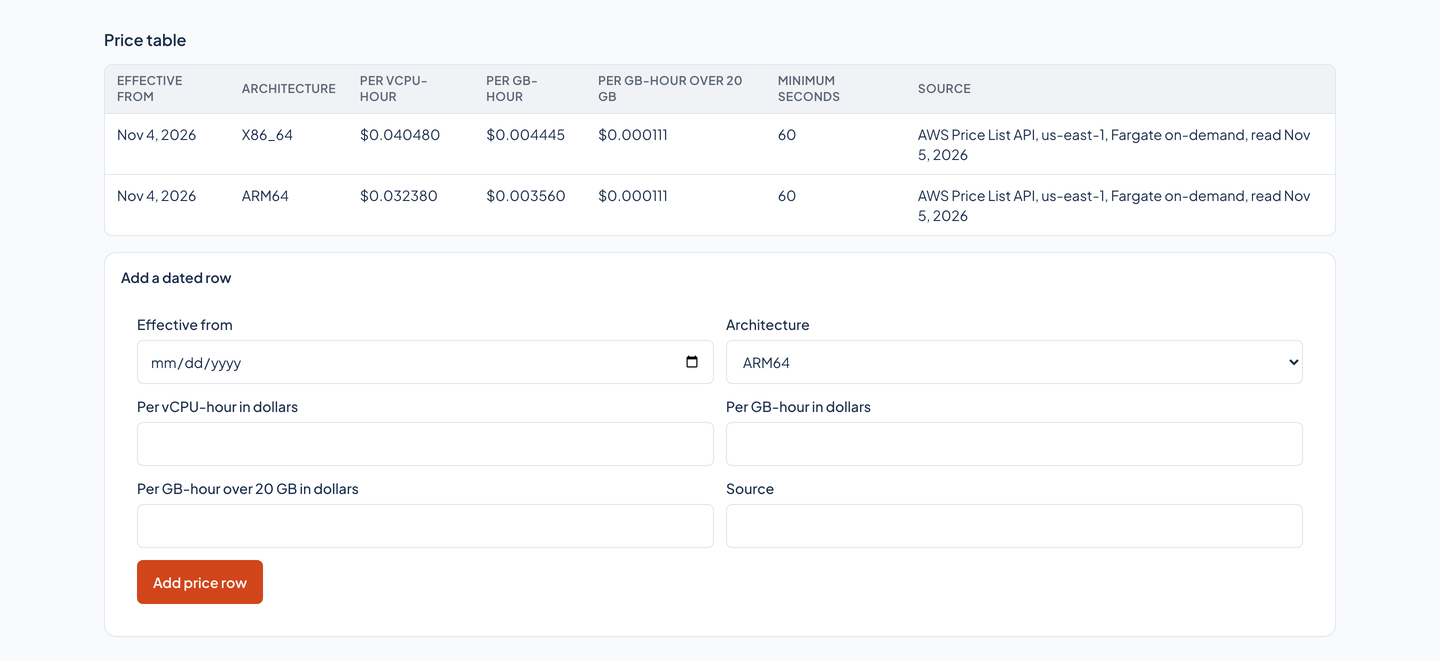
The rates live in a table of dated rows, each with its architecture and where it was read. A job is billed at the row it was priced on, so a new price never changes an old bill.
Spend by client, profile, and day
The spend page shows the month so far by client against its budget (with what running and queued jobs have reserved), the daily cost, the cost by profile, and the month's costliest jobs.
Changed by a person
Settings are a person’s act
A client's monthly budget, caps, timeout, and concurrency, a profile's sizes and timeouts, and the price table are changed in Settings, which only a signed-in person can reach. A service token cannot change them.
- Cancel, and cancel again
- Cancel stops a job that has not finished, and records who asked. Canceling a job that already finished changes nothing.
The parts under the page
- Storage is a plugin
- Where a job's bytes live is one interface with two implementations: a folder, for development and tests, and S3, for production. The interface has no delete, and one set of contract tests runs against both.
- Tokens stored only as hashes
- People sign in. A tool or an agent sends a service token, which Kiln keeps only as a SHA-256 hash (up to two per client, so a token can be rotated), and a service token sees and acts on its own client's jobs only.
See it in light and dark
Real captures of the running tool, with fictional StrataForge Robotics data. They follow your theme.
From a request to a record
Submit
A client sends a profile, a command, inputs, a size, a timeout, and a cost cap. The request is checked against the rules before anything is written.
Check the budget
The cap is added to the month's spend and to the caps of jobs still queued or running. A request that would pass the client's monthly budget is refused.
Queue
The job waits in order while its client is at its concurrency limit or the fleet's vCPU budget is in use, and the queue says why.
Watch
A job that is running has a state, a timeline, and a log, and it can be canceled. Its cap and timeout set the run time the watchdog allows.
Record
How the job ended, its outputs with their checksums, its log, and its cost are kept in the ledger, and every page reads from it.
Adjust
A person changes budgets, caps, concurrency, and prices in Settings, and the next submission is checked against the new numbers.
Built so everyone can use Kiln.
Kiln's web app is built on the Renkara design system. A scripted axe-core run covers eight of its views in light and dark at phone and desktop widths (32 scans, no violations), and the same run walks the keyboard on two pages and checks for sideways scrolling. Here is what the product supports today and what we have actually checked. We do not claim a WCAG conformance level for the product.
Partly supported
Keyboard operation
Every control is a native link, button, or form field, and a skip link comes first. In a scripted run, Tab walked 40 stops on the jobs list and 60 on the submit form, and every stop inside the page showed an outline or a ring in its computed style. We have not walked every flow with a keyboard alone.
Partly supported
Screen reader landmarks and labels
axe-core, which checks names, labels, roles, and landmark structure, found no violation on eight views in light and dark at phone and desktop width. Kiln has not been tested with a screen reader.
Supported
Contrast in light and dark
Text and controls are checked for contrast in both the light and dark themes, and the ember brand color is held to 4.5 to 1 on the card colors by a test in the app.
Not yet tested
Reduced motion
The design system's stylesheet shortens animation when a visitor asks for reduced motion. The scripted run found no running animation on the jobs list with or without the setting, so it could not tell the two apart, and the live indicator, the log, and the film player were not exercised.
Not yet tested
Text resize and zoom
Resizing text to 200 percent has not been tested.
Partly supported
Mobile and touch
All eight views fit a 375 pixel and a 320 pixel wide screen with no sideways scrolling of the page. At 375 pixels the menu button and the theme button are 36 pixels wide and 44 tall, the skip link is hidden until it takes focus, and the checkboxes in settings are 24 pixels square.
Under the hood
| Application |
|
|---|---|
| Service |
|
| Storage |
|
| Rules |
|
| Tests |
|
Questions people ask
Is Kiln available to other teams?
No. Kiln is internal to Renkara and is not offered for sale. This site shows what it does and how it is built. There is no sign-up on this site. Write to fleet@renkara.com with questions.
What is a job?
A profile (a pinned tool image), a command as a list of arguments, inputs, a size, a timeout, and a cost cap. Kiln keeps the job's state changes, its outputs with their checksums, its log, and its cost.
Can a job overspend?
Not past its cap or its client's budget. A submission is refused if its cap, added to the month's spend and the caps of jobs still queued or running, would pass the client's monthly budget. Each job's cap and timeout also set the time its watchdog allows.
How is a job's cost worked out?
From its billed seconds, never fewer than 60, and the hourly cost of its size and storage, using the dated row of the price table it was priced on. A later price never changes an earlier job's cost.
Can a job see my secrets?
A job's environment refuses any variable that looks like a secret, so a token cannot be handed to a command that way.
Where do the files live?
In a storage plugin: a folder for development and tests, or S3 for production. Both sit behind one interface that has no way to delete.
What do the tests prove?
The rules and the plumbing: validation, cost and budget arithmetic, admission order, the state machine, every route, and both storage plugins. They do not start a render, so they say nothing about whether a real render succeeds or is good.
Is the data in the screenshots real?
No. Every screenshot is a capture of the running web app over invented render work for StrataForge Robotics, a fictional company, written into a throwaway ledger and folder. The pictures and film in the outputs were drawn by a script for this tour. No job was run to make the captures, the log lines are invented text, and the log of the running job comes from a stand-in for the task runner that reads lines written for the capture.
Questions about this tool?
Write to Renkara Media Group and a person will answer.